AAAD Android Auto apps organizes discovery and fixes connection issues
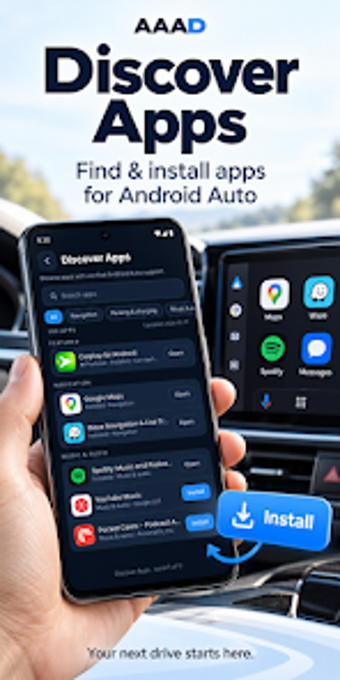
Shows a curated catalog of nearly 100 Android Auto-compatible apps and runs automated device checks for Bluetooth, Wi‑Fi, USB, and Android Auto before a drive. Syscraft Labs supplies this Android travel-navigation companion to help drivers discover Play Store listings and follow interactive checklists. It bundles troubleshooting assistants, direct settings shortcuts, and a CarStream setup guide. The app fits Android Auto users who need a guided setup and quick diagnostics to restore or verify a stable in-car connection.
It combines app discovery with direct Play Store links
The app offers an organized catalog of roughly 100 car-compatible navigation, audio, messaging, and parking apps, each linked to its official Play Store page. That catalog makes discovering compatible software straightforward without leaving the companion interface. The curated list focuses on official installations rather than unofficial sideloading tools, reflecting the developer's intent to keep recommendations within Google Play listings.
Device checks give concrete, step-by-step diagnostics
The diagnostic routines inspect Android version, Bluetooth, Wi‑Fi, and Android Auto installation status and present the results as interactive checklists. Those automated checks identify missing prerequisites before a drive and guide users through the exact system settings to open. Because the checks run on the device, the app reports local configuration rather than transmitting a user's live GPS or driving data to external servers.
Connection guides cover wired and wireless setups and CarStream
The companion includes separate, sequential instructions for USB and wireless Android Auto connections and a dedicated CarStream setup section that explains its requirements. Shortcuts jump to relevant system settings, letting users quickly toggle Bluetooth or Wi‑Fi without navigating multiple menus. The step sequences target common display and startup faults encountered when pairing a phone with an in-vehicle infotainment system.
Limitations and operational context users should expect
The app does not enable video streaming or screen mirroring; its CarStream material is purely a configuration guide. It requires Android 8.0 or higher and does not need root access, which keeps installation straightforward but means it cannot perform low-level modifications or sideload unofficial Android Auto clients. Some users report in-app advertising, which can affect the troubleshooting flow.
Practical companion for setup and diagnostics, not a replacement for Android Auto
The app is a practical companion for drivers who want guided setup, quick access to compatible Play Store apps, and local diagnostics before using Android Auto. It does not provide streaming or low-level modification functions, and users are responsible for ensuring their use complies with platform terms and local regulations. For those seeking a safe, Play Store–focused helper, it provides focused, device-level assistance.